
WordPress PC Builder Plugin
Create professional custom PC configuration systems on your WordPress website. Allow customers to build gaming PCs, workstation PCs, and custom computer systems with real-time pricing and WooCommerce integration.
What is a WordPress PC Builder?
A WordPress PC Builder is a powerful tool that allows visitors to configure custom computers directly from your website. Customers can select processors, motherboards, graphics cards, RAM, storage devices, power supplies, cooling systems, and cases before placing an order.
Rigboy PC Builder transforms your WordPress website into a professional PC configuration platform designed for computer stores, gaming retailers, system integrators, and eCommerce businesses.
Key Features of Rigboy PC Builder
Component Selection
Allow customers to choose CPUs, GPUs, RAM, SSDs, HDDs, power supplies, cooling systems, and cases.
Compatibility Checking
Prevent incompatible hardware combinations and reduce ordering mistakes.
WooCommerce Integration
Complete PC builds can be added directly to the WooCommerce cart and checkout.
Dynamic Pricing
Display real-time pricing updates as customers select components.
Responsive Design
Works perfectly on desktop, tablet, and mobile devices.
Easy Management
Manage PC components and configurations from the WordPress dashboard.
Benefits of Using a WordPress PC Builder
- Increase online sales
- Improve customer experience
- Reduce support requests
- Increase average order value
- Provide custom computer configurations
- Automate compatibility validation
- Build customer trust
Who Should Use This Plugin?
Rigboy PC Builder is ideal for:
- Computer Stores
- Gaming PC Retailers
- Custom System Builders
- Technology Shops
- Online Electronics Stores
- WooCommerce Businesses
Why Choose Rigboy PC Builder?
Unlike generic WooCommerce product pages, Rigboy allows customers to build their own PC with complete flexibility. Users can compare components, customize hardware configurations, view updated pricing, and purchase their perfect computer system directly from your website.
The plugin is optimized for speed, usability, and conversion-focused design, making it one of the most powerful WordPress PC Builder solutions available.
Frequently Asked Questions
Does Rigboy work with WooCommerce?
Yes. Rigboy PC Builder integrates seamlessly with WooCommerce.
Can customers build gaming PCs?
Yes. Customers can create gaming PCs, office PCs, workstation PCs, and custom systems.
Is coding knowledge required?
No. The plugin can be configured directly from the WordPress admin dashboard.
Is the plugin mobile friendly?
Yes. Rigboy PC Builder is fully responsive and optimized for mobile devices.
Can I customize component categories?
Yes. You can create custom categories and component groups according to your business requirements.
Start Building Custom PCs Today
Transform your WordPress website into a professional PC Builder platform and provide your customers with a modern PC configuration experience.
Get Rigboy PC BuilderRigboy PC Builder transforms your WordPress website into a professional PC configuration platform designed for computer stores, gaming retailers, system integrators, and eCommerce businesses.
wordpress pc builder wordpress pc builder plugin pc builder plugin for wordpress custom pc builder wordpress wordpress computer builder. fighters to
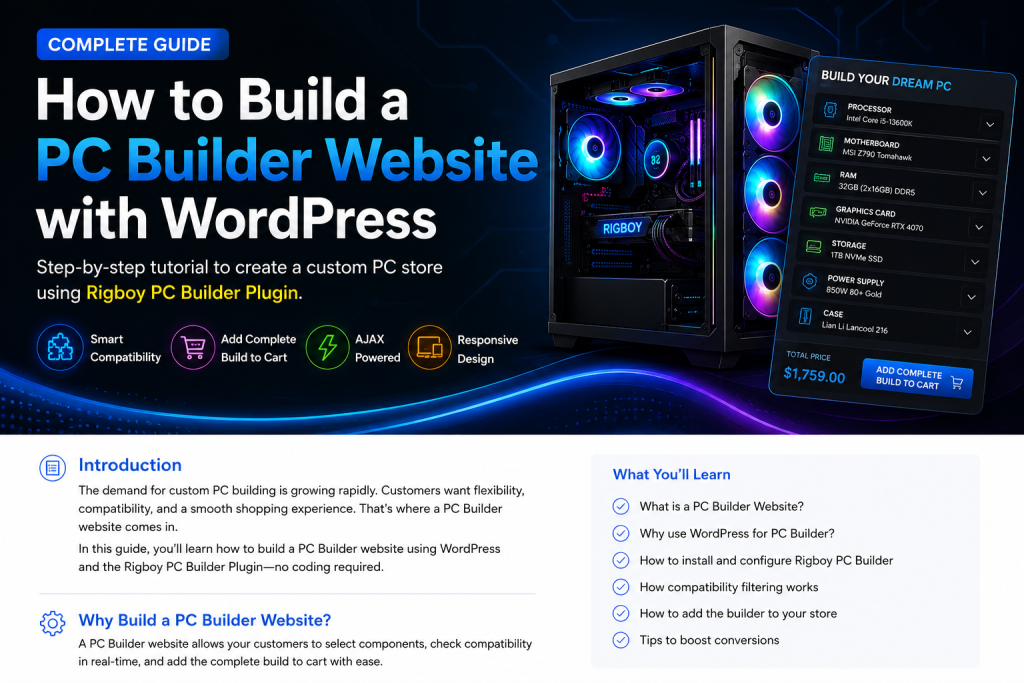
How a PC Builder Improves Online Sales
Customers prefer personalized products. A PC Builder allows visitors to select components that match their budget and performance requirements. This improves engagement, increases average order value, and helps businesses sell more custom computers online.
WooCommerce PC Builder Integration
Rigboy integrates seamlessly with WooCommerce, allowing complete PC configurations to be added directly to the shopping cart. Orders are processed using standard WooCommerce workflows, making management simple and familiar.
Gaming PC Builder Features
Gaming enthusiasts can select processors, graphics cards, memory, storage, cooling systems, and cases to create powerful gaming computers. Real-time pricing helps customers stay within budget while maximizing performance.
Custom PC Configuration Process
- Select a processor
- Choose a compatible motherboard
- Add memory and storage
- Select a graphics card
- Choose power supply and case
- Review configuration
- Add to cart and checkout